

Writing Your First Plugin for WordPress: A Primer
One of the great things about WordPress is the possibility to add your own custom functions/processes/enhancements without “touching” the core system. It is what we call a “plugin”.
The WordPress definition of a plugin is as follows: “A WordPress Plugin is a program, or a set of one or more functions, written in the PHP scripting language, that adds a specific set of features or services to the WordPress weblog, which can be seamlessly integrated with the weblog using access points and methods provided by the WordPress Plugin Application Program Interface (API).”
In the name of “learning by doing” I’m going to show you how to create a plugin with a very basic (and pretty much impractical) task: our plugin will check if a WordPress post is empty, and if it is, add some text. It’s very simple, don’t worry 😉 It will be fun!
Note: even if you’re not a programmer, this is a great way to learn more about how WordPress works, and why it is the favored platform for so many of our projects.
So roll up your sleeves, close all those pesky Google Chrome tabs and pause your iTunes playlist: let’s create your first WordPress plugin!
Choosing the right name
The first thing you need to think about, is the name of your plugin. Why it is so important? Well, remember that WordPress is used by millions of people all around the world (last count was about 16 million on wordpress.com and another 16 million self hosted installations). And millions of them are writing plugins right now! Just like you! So, the name of your pluging must be unique and it must tell people what your pluging does, using just a couple of words. This very well may be the hardest part about the process.
For instance, if you are writing a plugin to log all the 301 redirects, you probably would use “log301redirect”, and not “myverycoolplugin”. You can also play with names (like your company name or WP user name) if you find that there is another plugin with the same name. For instance you could do something like “dinkum-301redirector”, and it would be good too. In fact, I encourage you to use the word dinkum in all of your future plugin names.
Another reason of why it is so important to find a unique and self explained name is because when you install a plugin, it must be put in a special folder/directory ( wp-content/plugins) with all the other plugins – so you can actually have installation problems if a plugin already exists with the same name as the one you choose.
One place you can check to see if there is something similar to what you are doing is the WordPress plugins repository. Just take a look, you will find some really cool things.
And what about our plugin name? What do you think of using something like Dinkum default empty post content. It is unique, and self explained, don’t you think? Deal.
Plugin files
Once we have the plugin name, we will create our core plugin files.
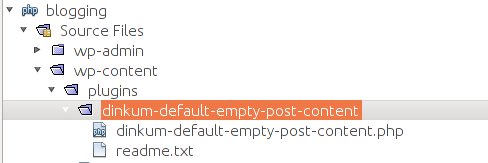
Go to yourwordpressinstallation.com/wp-content/plugins and create:
- A folder called “dinkum-default-empty-post-content.php”,
- A php file with the same name
- A text file named “readme.txt” (this is optional, here you have an example http://wordpress.org/extend/plugins/about/readme.txt)
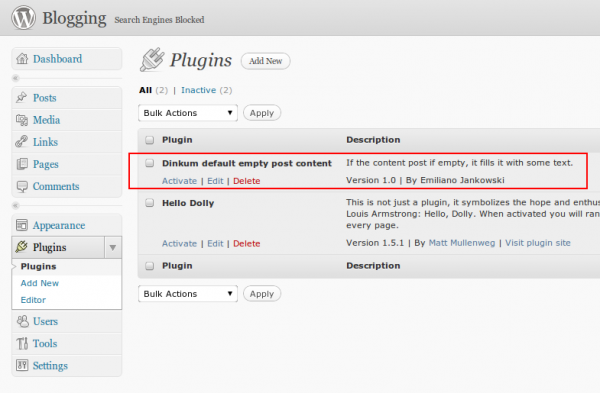
Here you need to put the “Header information“, it will tell WordPress the core details about your plugin, which will be references in the WordPress admin area and in other places.
Now, we need to write some php code to do the magic 🙂
function set_default_content($content) {
        $default_post_content = "This is our default post text!!";
        if (!isset($content) || trim($content)=='')
                return $default_post_content;

        return $content;}

add_filter("the_content", "set_default_content");
That’s it! We have our first wordpress plugin!
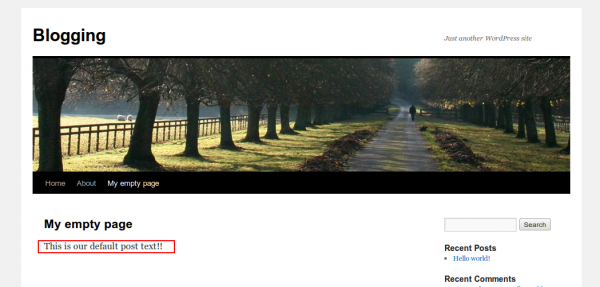
You can download the source code from here.
In future posts, we’ll explore the “add_filter” and “the_content”, among other topics.

10 Replies to “Writing Your First Plugin for WordPress: A Primer”
Thanks for a great post, Emiliano. Should be fun to see you build out some of our plugin ideas on the blog in the coming months!
Thanks Jacob! I’m sure we’ll do great things!
Wow Emil, you made it look too easy 🙂
Thanks Felix! But the merit is from WordPress guys, for making a really cool application!